Guides
Workspace web console
inferlab web serves a browser console over one or more workspaces. It
presents the same operations, records, and definitions as the
view-only TUI, compares Bench records across workspaces, and launches
a small set of workflows by invoking the InferLab CLI. The CLI remains the only
action authority and records remain the only evidence: the console itself
writes no record.
inferlab webinferlab web --port 8800inferlab web --refresh-interval 2sinferlab --workspace /path/to/workspace webThe console prints one access URL on stdout and keeps running until it is interrupted. Open that URL in a browser: started inside a workspace, it opens that workspace’s Overview; otherwise it opens the workspace list.
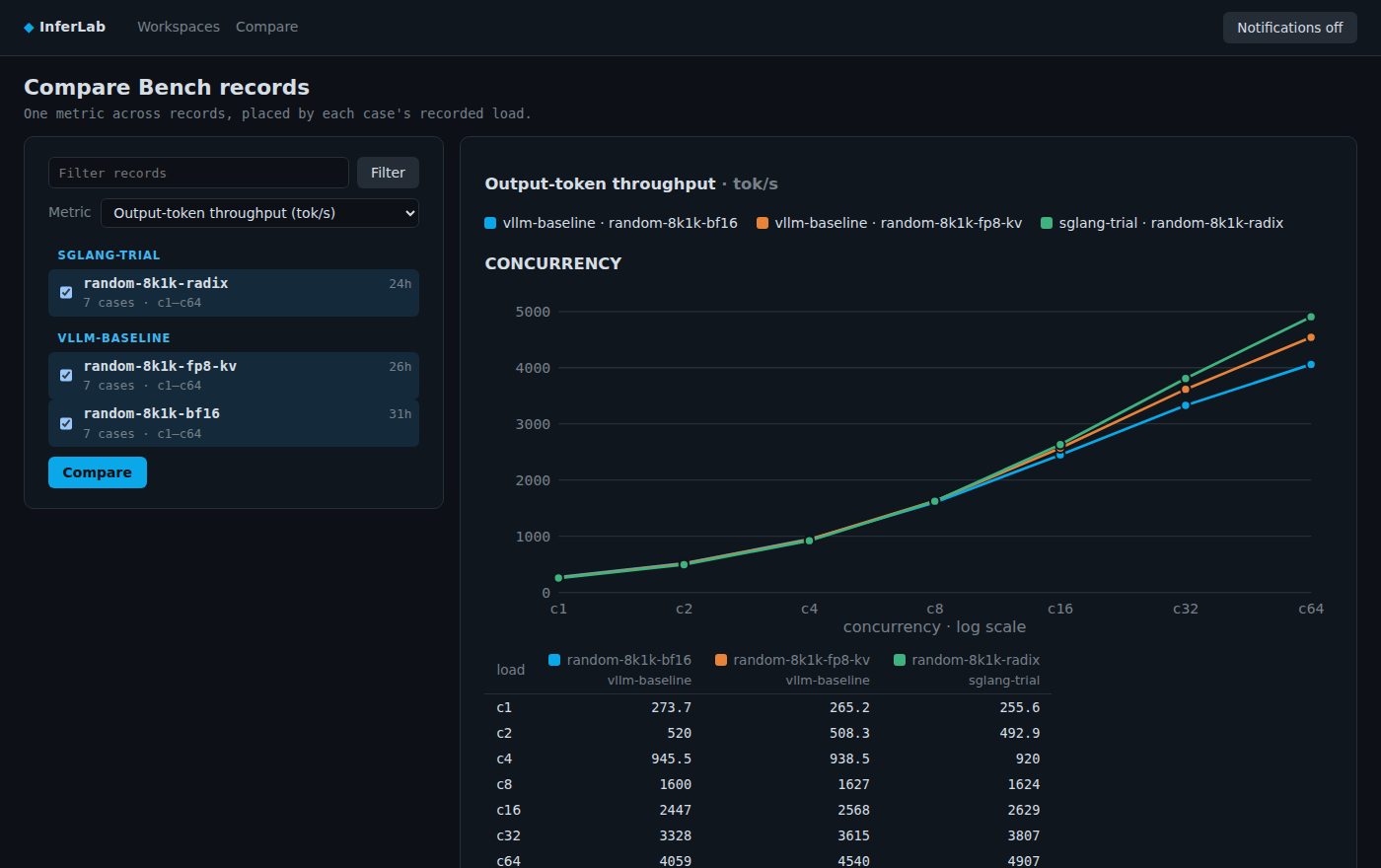
Rendered by the real InferLab web console with synthetic demo data; no local workspace or machine identifiers are shown.
Access
Section titled “Access”The console listens on 127.0.0.1 unless --bind selects another address;
with a non-loopback address it warns that its traffic is not encrypted. It
picks a free port unless --port names one.
Each start generates a new access token, and the printed URL carries it. The
first visit exchanges the token for a browser cookie and removes it from the
address bar; every later request needs that cookie, and a request without it
receives 401. Anyone holding the URL has every capability of the console,
including launching work under your account, so share it only with people you
trust. Restarting the console invalidates every earlier URL.
To reach a console on a remote host, forward its port over SSH and open the printed URL locally:
ssh -L 8800:127.0.0.1:8800 gpu-host # on the remote host: inferlab web --port 8800Workspaces
Section titled “Workspaces”Started inside a workspace, or with --workspace, the console registers that
workspace. Workspaces lists every registered workspace; Add workspace
browses local directories, marks the ones that contain
.inferlab/workspace.toml, and registers the one you choose. Remove
unregisters a workspace without touching its files. The registry is kept per
user under $XDG_STATE_HOME/inferlab/web/workspaces.json
(~/.local/state/inferlab/web/workspaces.json when XDG_STATE_HOME is unset),
so it survives restarts, and a change made in one console keeps those made by
another. A registered root that loses its .inferlab/workspace.toml stays
listed as unavailable; a workspace whose definitions fail to load is listed
with that failure and still opens, since its records and operations remain
readable.
Each workspace has Overview, Operations, Records, and Workspace tabs with the TUI’s content, authority labels, and record hierarchy, plus Jobs for launched work. Overview and Records offer the TUI’s status filter as all, issues, and running; a recipe in Records expands to its child server and measurement records. Selecting a row opens its detail beside the list, including a workload record’s case metrics table. Logs that a record or an operation explicitly references open as a bounded tail that pages to earlier lines on demand.
Every workspace refreshes in the background on the --refresh-interval
cadence, and an open page updates in place when a new refresh completes. The
header shows the refresh indicator, and Refresh re-reads every source
immediately. A workspace that is slow or fails to load does not hold up the
others.
Compare
Section titled “Compare”Compare lists the Bench records of every registered workspace. Select one
or more, choose a metric, and the page charts one line per record, labeled with
its workspace and record. Points are placed by each case’s recorded effective
load, never by case identifier, so sweeps from different workspaces line up.
Concurrency and request-rate cases get separate charts, and a load range
spanning a factor of eight or more reads on a log scale. Workspaces are named by
their directory, with parent directories added when two registered workspaces
share a name. A table below each chart holds the same values:
— means the case recorded no value for the metric, and an empty cell means the
record has no case at that load. Cases whose load has no numeric value, such as
an unbounded request rate, are listed in a table rather than charted. The
comparison uses the TUI’s metric names and units and adds no SLO
interpretation. A Bench record’s detail offers Compare to start from it.
Jobs launches serve start, serve stop, recipe run, bench, and
scratchpad note, and nothing else. Each form has typed fields: definitions
and running server records are chosen from the workspace, and the case,
placement, topic, and record references are optional. The forms offer the
committed definitions only; launch a definition from
.inferlab/workspace.local.d/ with the CLI, adding --detach when the run
must outlive the session, and it appears here as a job. The console builds the
command for its own executable with --workspace set to the workspace root.
Field values are passed as values, never parsed as options or by a shell.
serve start, recipe run, and bench show a preview first: the console runs
the same command with --dry-run and shows its output, its exit status, and
the exact command it will launch. Launch appears only when the dry run
succeeds. The launched command resolves again when it starts; the preview does
not bind it.
A launch creates .inferlab/runtime/jobs/<job-id>/ in the workspace. It holds
the launched command, its start time, the process’s host, boot, process
identifier, and start time, its stdout and stderr as separate logs, and its exit
status once it ends, and, if the command creates a record, the identifier and
directory of the first one. A job’s detail links to that record, and a job
launched from the CLI is listed under that record, or under its job identifier
until the record exists. The job runs detached in its own process group, so
stopping or restarting the console does not stop it, and a restarted console
finds every job again from its directory. A launch that cannot start shows its
error and leaves no job directory. The console does not queue or deduplicate
launches; the CLI’s own locks govern concurrent work. Job files are run-time
conveniences rather than evidence, and the console never deletes them. A job
launched from the CLI with --detach uses the same directory layout.
A job reads as running, as exited with its exit code, as
interrupted or ended by another signal, as ended, status unknown when
no exit status was recorded and the recorded process is no longer running, or
as not observable from this host when it was launched on another host or
before a reboot and recorded no exit status. Interrupt sends the running
job the interrupt a terminal Ctrl+C sends, as inferlab job interrupt <job-id>
does from the CLI; repeat it if needed. It never escalates to a kill and leaves
cleanup to the CLI. The console signals
only after the recorded host, boot, and process identity match the live
process, so it never signals a process that reused the job’s process
identifier.
Notifications
Section titled “Notifications”The top bar’s Notifications button enables browser notifications in that browser; they stay off until you enable them, and the browser asks for permission the first time. While any console page is open, a notification appears when a job of a registered workspace ends or when a running server’s observed process dies, including a server a recipe started; selecting it opens the job or the server. Select the button again to turn them off.